
One piece, new possibilities
AI outfit ideas, starting with one item
Choose a piece from your wardrobe and let OutfitMuse suggest ways to style it. Use the results as inspiration, then adapt the outfit to your own clothes and plans.
Get OutfitMuseDownload for iPhone or Android from the stores listed on this site. Check your store for device compatibility and availability.
Availability and support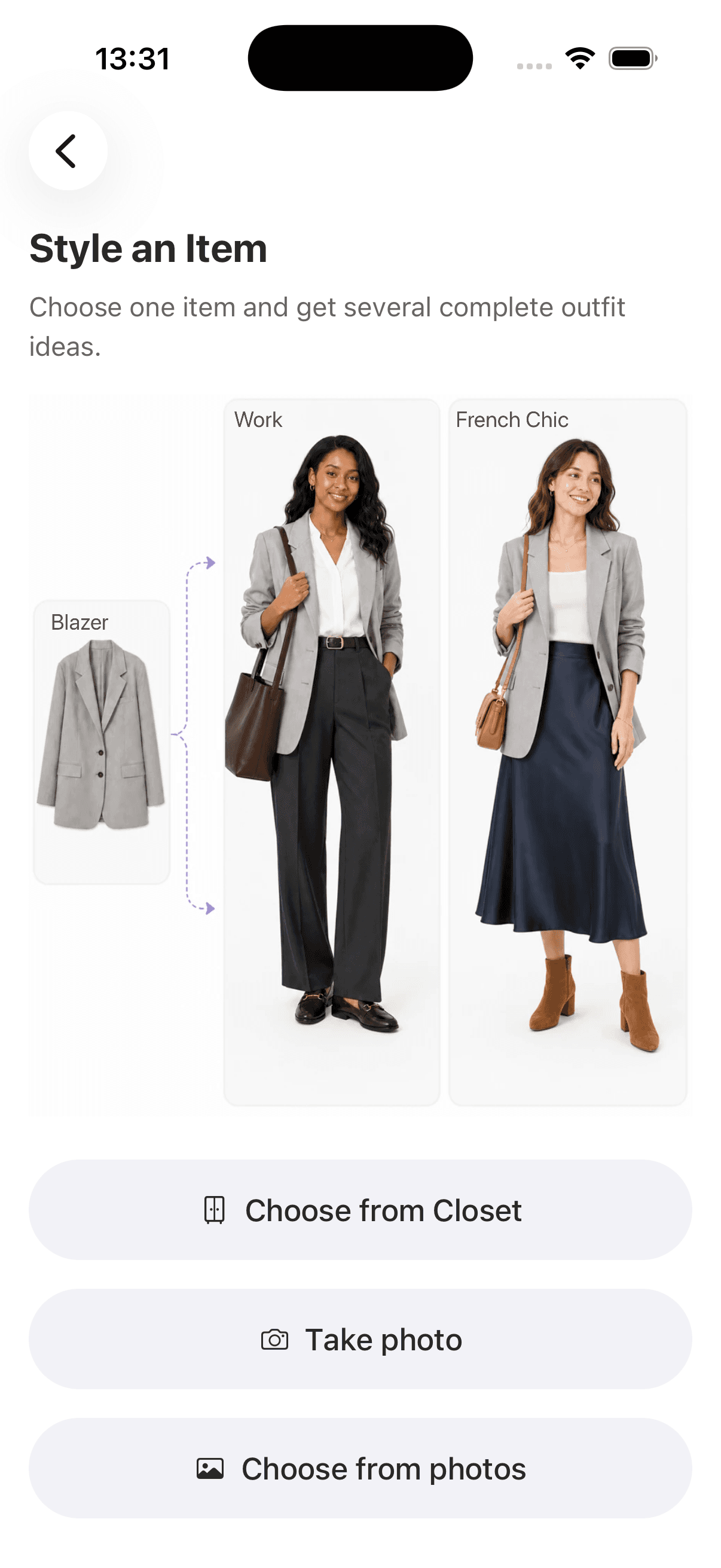
From one item to an outfit idea
- 1
Pick one item
Choose one item from your wardrobe in Style an Item. Start with something you want to wear, such as a blazer, a skirt, or a pair of shoes.
- 2
Give the outfit a direction
Choose an occasion and style preferences to guide the outfit ideas. Then review the generated looks and styling notes, including any suggested pieces that are outside your wardrobe.
- 3
Adapt the idea to your day
Compare the result with clothes you own and your plans. Try the combination yourself and adjust it for the weather, comfort, and any dress code you need to follow.
One gray blazer, different directions
The example screen pairs a gray blazer with two different outfit directions: a work look and a French-chic look. The useful question is which combination you can recreate with your own pieces. A suggested layer or accessory can be a starting point for experimenting, even when you do not own the exact item shown.
Styling inspiration still needs your judgment
Results may include clothes or accessories outside your wardrobe. Generated images are styling references and do not establish how a garment will fit, feel, or look on your body. Review the pieces and try the outfit before relying on it for an occasion.
Frequently asked questions
How does the AI outfit generator use my clothes?
Style an Item starts from one item you select from your wardrobe. The resulting outfit may include both wardrobe items and other suggested pieces; the current flow does not guarantee an outfit made entirely from clothes you own. If that is essential to you, check every suggested piece against your wardrobe before deciding whether the outfit works for you.
What should I do if a suggestion includes something I do not own?
Treat it as a styling idea, not a shopping requirement. You can look through your own wardrobe for a piece with a similar role, such as another layer or pair of shoes, and try the combination yourself. Compare any substitutions with the suggested look and check whether they work for your plans.
Can I select several items at once?
The current Style an Item flow lets you select one starting item at a time. Use that item as the anchor and review the resulting outfit ideas.
Is this the same as virtual try-on?
This page describes outfit recommendations around a selected wardrobe item. An outfit suggestion is not proof of how a garment will fit your body. Treat the generated look as inspiration and check the real outfit yourself.
How do I add an item before styling it?
Add a clothing photo from your camera or gallery to the digital closet, then choose that wardrobe item in Style an Item. You can begin with a few pieces instead of cataloging your whole wardrobe.