
Outfit guides
How to Build an Outfit Around One Item You Own
By OutfitMuse ·
To build an outfit around one item, choose the piece you want to wear, decide where you are going, and look for clothes that work with both. If you use AI outfit suggestions, check which pieces you actually own and try the combination before relying on the image.
Starting with one item gives you a concrete decision to make. You might have pants you rarely reach for, a jacket that feels too formal, or shoes you want to wear more often. The useful result is a combination you can understand and adapt to your day.
This guide explains how to approach that task with OutfitMuse's Style an Item workflow, including what to check when a suggestion contains clothing outside your wardrobe.
Choose the piece and the situation
Pick an item you own and genuinely want to wear. Then give yourself a specific situation to dress for: a day at the office, a casual dinner, or a weekend that involves a lot of walking.
Keep practical needs separate from the visual direction. “Relaxed” describes a style; “comfortable enough to walk to lunch” describes something you will need to check in your real clothes. An appealing image cannot tell you whether your shoes are comfortable or your jacket is warm enough.
You do not need an elaborate brief. A useful starting note is:
I want to wear this item for this occasion, and these are the practical conditions the outfit needs to meet.
This is a way to clarify your own decision, not a requirement to enter every detail into an app field.
Start from a recognizable wardrobe item
If you are using a piece saved in OutfitMuse, make sure its clothing photo is clear enough to recognize. Compare the image with the actual garment, especially if you have several similar pieces.
Add relevant companion items to your digital closet when useful. A collection containing only the starting piece does not give the app a complete record of everything else you own. Even with a larger collection, however, you should not assume that all recommended pieces will come from it.
If you have not set up a collection yet, our wardrobe digitizing guide covers taking photos, checking item details, and confirming that the items have been saved.
Use Style an Item to explore a direction
Start from Home → Style Item. For the wardrobe-based flow, select one starting item, then choose the occasion and style options that fit your goal. The current selection step uses one item at a time.
Review the completed outfit ideas and their styling notes. Look for what the suggestion is doing around your selected piece: adding a layer, changing the balance of the outfit, or using shoes and accessories to give it a different feel.
The product's AI outfit guide explains this workflow and its limits. OutfitMuse is available for iPhone on the App Store and Android on Google Play in supported regions. See availability and support for your device and store region.
Read three outfit directions around a light-blue shirt
We captured these images from the English App interface on September 20, 2026. The starting item was listed in the account's digital closet as a “light blue long-sleeved button-up shirt.” The three flatlays below came from History. This is a review of visible outfit suggestions, not a report of wearing the outfits or a comparison of separate generation runs.
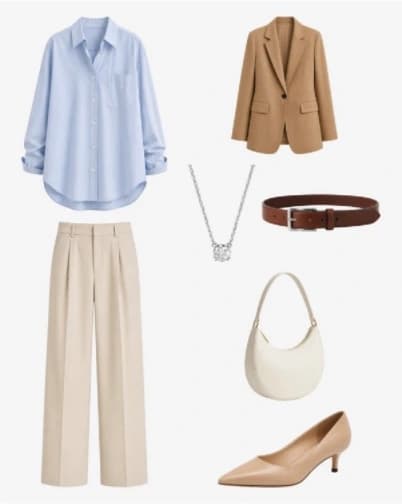
Camel blazer and beige pants: an AI-generated suggestion retrieved from History.
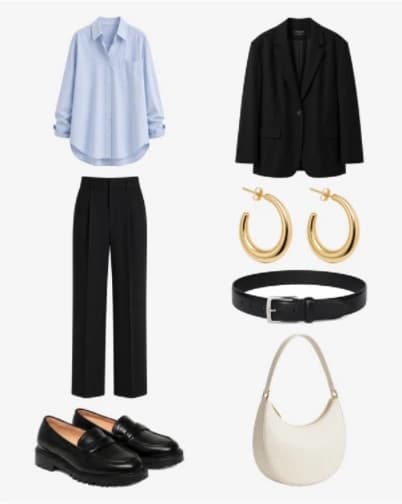
Black tailoring and loafers: a second image retrieved from History.
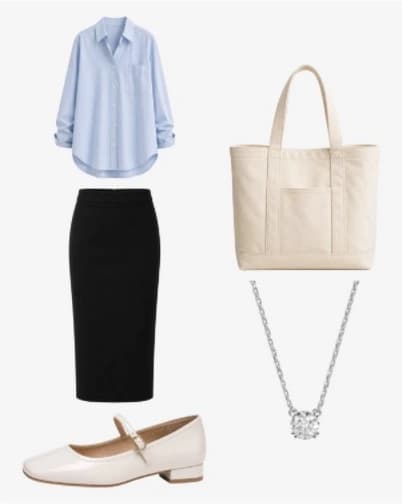
Black skirt and cream flats: a third image retrieved from History. These suggestions are not photographs of complete outfits assembled from verified possessions.
| Direction shown | What changes around the shirt | A practical check before using it |
|---|---|---|
| Camel blazer and beige pants | A brown belt, cream bag, necklace, and pointed heels accompany the lighter separates | Check whether you have suitable layers and shoes for your commute |
| Black blazer and black pants | Loafers, a black belt, hoop earrings, and a cream bag create a darker combination | Try your actual blazer over the shirt and check the pant length with your shoes |
| Black skirt and cream flats | A cream tote and necklace accompany a simpler combination without a jacket | Check the skirt's movement and coverage, plus whether you need another layer |
The camel-and-beige look was also visible on a Style an Item result page. Its AI-generated styling note described the blazer as adding structure and the pointed heels as refining the silhouette. That explains the suggested direction; it does not establish that the shoes are comfortable or that the outfit meets a particular office's dress code.
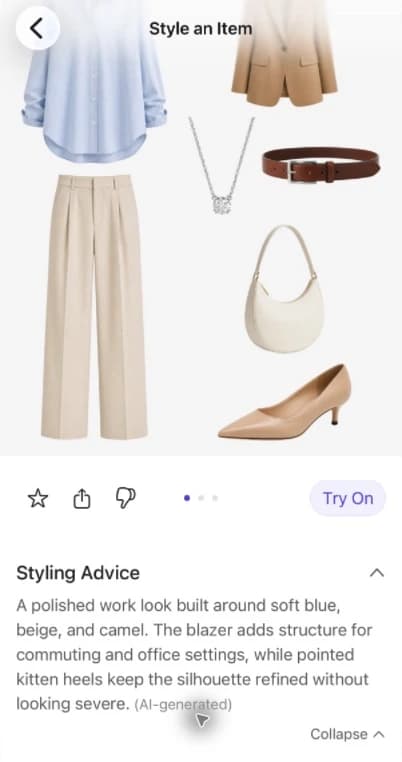
An actual result-page capture, cropped to remove the phone frame and status bar. The styling explanation is generated advice, not a wear-test finding.
For this review, the starting shirt's digital record was confirmed. We did not verify ownership of every suggested companion piece, and History did not show the original occasion and style settings for each image. The useful next decision is therefore specific: choose a direction, identify the exact pieces you already have, and try any substitutions before calling the outfit ready to wear.
Separate what you own from what the image suggests
Before deciding that an outfit is ready to wear, compare its pieces with your actual wardrobe. You can make a simple note outside the app:
| What you can establish | What to do next |
|---|---|
| You recognize the exact item and own it | Check that it is available and suitable for the occasion |
| You own something similar, but it is not the exact suggested piece | Treat it as a possible substitution and try the combination |
| You do not own the suggested piece | Decide whether the idea still works with something you already have |
| You cannot tell whether the image represents one of your items | Keep it unconfirmed until you can compare it with the real garment |
These are review categories for your own notes, not labels the app necessarily displays for every piece.
A familiar color is not enough to establish that an item is yours. Two black jackets can differ in length, structure, and how they sit over the rest of an outfit. If a suggestion depends on a garment you cannot identify, treat that part as inspiration rather than proof that you can recreate the look.
Style an Item does not guarantee that the complete suggestion uses only clothes you own. If your goal is to dress without buying anything, check the whole combination, including shoes and accessories.
Adapt the idea before adding a shopping requirement
An unfamiliar item does not have to become something to buy. First ask what role it plays in the suggestion.
For example, a suggested outer layer might add warmth, structure, or contrast. A bag might simply repeat a color already in the outfit. Once you identify that role, you can look for something in your own wardrobe that serves it.
Consider this illustrative substitution: a suggestion includes loafers you do not own, but you have ankle boots. You could try the boots with the same pants and starting item, then check the pant length, overall appearance, and comfort. The substitution might work, or it might change the outfit enough that you prefer another direction. This example is styling guidance, not a reported OutfitMuse result.
Make one adjustment at a time when comparing options. Keeping the other pieces the same can make it easier to judge what changed. There is no need to buy a suggested accessory just to match the image exactly.
A worksheet for adapting a suggestion to your wardrobe
Turn an idea into a list of real clothes to try. Make the entries in your own notes; this is not an automatic replacement feature in OutfitMuse. Write down the starting item, occasion, and practical requirement first—for example, “Green skirt; casual lunch; comfortable shoes for a walk.”
“Owned” and “ready to wear” are separate checks. A piece might be in the laundry, need a repair, or no longer feel comfortable.
| Suggested piece | What is available | What I will try or check |
|---|---|---|
| Green skirt | Owned and ready | Keep it as the starting item |
| Cream blouse | Not owned; white cotton shirt available | Check how the longer shirt hem sits with the skirt |
| Brown ankle boots | Not owned; dark flat shoes available | Check weather and walking comfort |
| Short jacket | Not owned; cardigan available | Check warmth and the softer shape |
This is a hypothetical example, not a recorded app result or an exact visual match. For each replacement, finish this sentence:
I am replacing ___ with ___ because ___. The difference I need to check is ___.
After trying the combination, record keep, change, and try next. Finish with a usable note: “For lunch, wear ___ with ___ and ___.” If no combination works, choose another starting item. Missing pieces do not have to become a shopping list.
Check the outfit on your body and in your day
Once you have identified a possible combination, try the real clothes. Pay attention to the parts a generated image cannot settle for you:
- Movement and comfort: sit, walk, and raise your arms as you would during the day.
- Layers and weather: check whether you need warmth, ventilation, or rain protection that the suggestion does not establish.
- The occasion: use the actual dress expectations of the place you are going.
- The garments themselves: compare color, length, fabric, and coverage with the image rather than assuming they match.
A look can be visually interesting and still be wrong for a particular day. You can keep the idea for another occasion without treating the suggestion as a failure or forcing yourself to wear it.
Keep a note of the combination you would repeat
If you find an outfit you like, take your own photo or write down the pieces and any adjustments. A note such as “these boots work with the shorter pants” can be more useful next time than remembering only that you liked the generated image.
The task is complete when you can identify what you would wear and why it suits your plans. You can return to the same starting item later with another occasion in mind, while keeping the same checks: what you own, what needs adapting, and what works when you actually put it on.
If you are still choosing a tool, our wardrobe app selection guide explains how to evaluate it around your own task.